I have spent the weekend using GitHub Agentic Workflows to make Repo Assist, a generic, all-purpose automated repository assistant for software maintainers. For some repos, some of the time.
I crafted RepoAssist for my own purposes, for helping with repos with long term technical debt. These are repositories where:
- The project is valuable ✨
- You want it to survive and thrive 🌱
- You’re a maintainer but it’s not your main thing 🧭
- You’re willing to give oversight 👀
- You’re willing to automate activity in the repo using coding agents ⚙️
I used Repo Assist to re-engage with 4 repositories which had gone “stale” with 100s of open issues unaddressed streching back years. And honestly, the results have been startling. I cleared over half the technical debt combined, released several new versions, and incorporated long-asked for features and important new capabilities. What’s most important,, however, is this: I enjoyed being a maintainer again.
I then installed Repo Assist into two other repositories maintained by Krzysztof Cieslak and Chet Husk (they also enabled automatic CI checks). The result:
I think I may be in love with Repo Assist… stuff like that is just gorgeous. Small PR for the feature no one had time to implement, adds unit tests, CI green. Simply lovely. @Krzysztof-Cieslak
So if you’ve software you want to maintain long term, or if you have repositories you want to crunch the technical debt on, or if you’re just interested in the practice of repository automation and Continuous AI, read on!
How is this Safe?!
Repo Assist is running automated AI. In my repository. On GitHub. Let me explain.
Like other agentic workflows, inside the running workflow Repo Assist uses a coding agent (Copilot CLI, Claude Code, Codex or Gemini), running it headless and triggering runs on GitHub Actions in automated, proactive way. Crucially, this is done with strong guardrails, threat detection and firewall and the agentic step runs read-only This is mainly because of the Safe Outputs mechanism of GitHub Agentic Workflows, as well as its overall Security Architecture.
This is a big deal, because guardrails mean you can automate.
Crucially, the range of actions Repo Assist can perform is tightly constrained. For example, it can
- Add labels to issues, but only specific ones
- Add comments to issues, but not delete them
- It can create pull requests, but only a limited number of them per run, with a specific title prefix.
- Add commits to pull requests, but only ones it created (with [Repo Assist[ title prefix)
Strong, declarative guardrails are fundamental to successful agentic automation. They allow me to sleep well at night, while RepoAssist is doing its thing, helping farm issues and create pull requests. If you’re running agentic coding agents in an automated way and don’t have these guardrails, you have good reasons to be worried.
Coming Alive Again as a Maintainer
Making software is one of the most enjoyable things people get to do. Making software collaboratively is even more exciting and rewarding: you get to lead the way on a software project, hone your decision making skills, learn the pros and cons of design choices, grow your technical understanding, get real users giving using your things, get real feedback, meet people from all over the world, expose yourself to new ideas, be part of a community, be part of something bigger than your own existence, and collaborate with brilliant minds.
Maintaining software can also be enjoyable….for a while. But let’s be honest, maintaining software can be hard. It can be draining. And it can eventually wear you down.
I have thought a lot about this problem. First in the abstract – how The Joy of Creating becomes The Burden of Creation – our tendency as humans to enjoy the potential of creation but feel a burden from the actual reality we inhabit. I am also deeply experienced with it in the very nitty gritty of the reality of the coal face of software – that late night when you’re struggling with 400+ issues in a repository used by many people, and you just can’t make progress. Again and again you’re faced with that issues list, or with comments and contributions, or pull requests, and you just can’t seem to get the overall bugs to come down. You’re trapped in an endless battle between complexity, stability, fear of breaking people and yet a desire to still take things forward.
As a small example, I am maintainer on FSharp.Control.AsyncSeq. This library is used widely by the F# community and was the first implementation of functional programming over asynchronous sequences using language-integrated async programming (which became async/await), and so is part of a sequence of historic developments that changed programming. But in recent years I had not been giving even this library the love it deserved, and it showed: basic interoperability was not improved, features were not added, questions were not answered.
I mentioned above I have used Repo Assist to re-engage with 4 major pieces of software from the F# ecosystem. Helped by about 200 runs of Repo Assist:
- I totally cleared the technical debt from FSharp.Control.AsyncSeq and released two major new versions incorporating long-asked for features and important new capabilities.
- I cleared half the technical debt from FSharp.Data, labelled all issues in the repository, added 3 major new features, and made 3 releases.
- I worked with the wonderful Florian Verdonck to apply Repo Assist to FSharp.Formatting, the documentation toolchain for F#, labelling all its issues, fixing multiple niggling issues and answering a host of question issues closing them out.
- And tonight I have started applying the tool to FSharp.TypeProviders.SDK, the SDK for creating F# type providers.
3 days, 4 repositories. The real kicker is this: before using Repo Assist, I had disengaged from these repos. I was unable to face the 10s or 100s of niggling issues, unable to deal with the technical matrix, unable to focus, unable to be productive in engaging with the people contributing ideas.
After using Repo Assist these last two days, it’s a blast. It’s pleasant. It’s fun. I’m making progress. I can see the path to healthy, sustainable software again.
The Burden of Creation is once more The Joy of Creating. And that’s golden.
What’s it like to use Repo Assist?
Using Repo Assist is simple:
- You add it to your repository
- It does useful things automatically and repeatedly, at a pace you choose
- It reports in an issue
The mardown tells the story. It’s simple. You can edit it (usually with a coding agent): change its priorities, add new tasks. If you use it, it’s up to you what it does for you. You are in control.
The default action of Repo Assist is best viewed diagramatically:
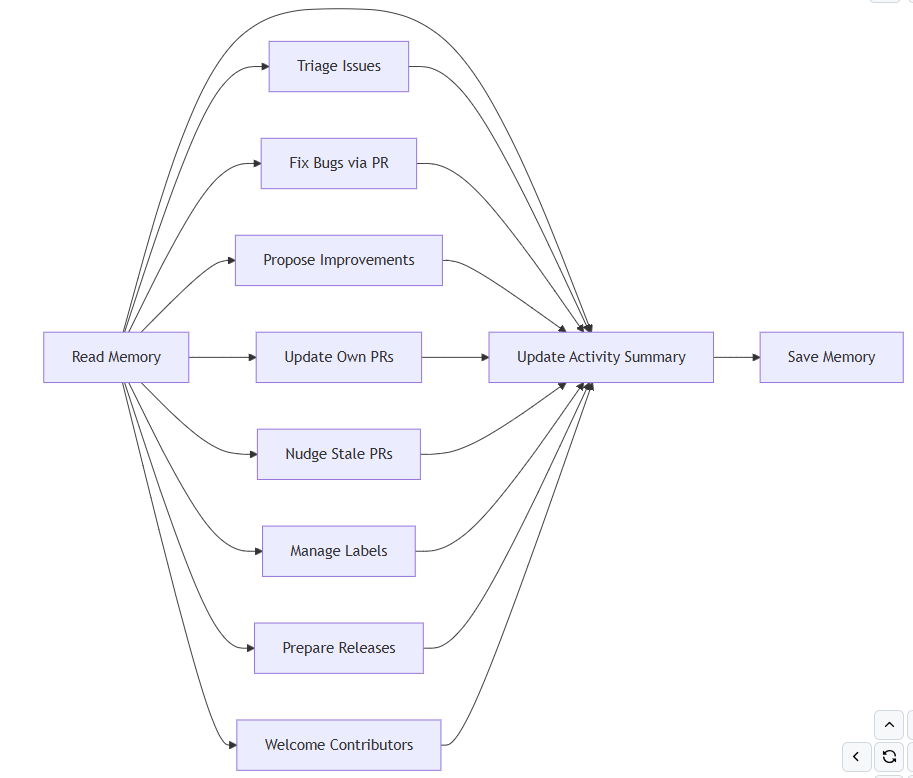
Installing is easy:
# Install the 'gh aw' extensiongh extension install github/gh-aw# Add the workflow to your repositorygh aw add-wizard githubnext/agentics/repo-assistLike all GitHub Agentic Workflows, Repo Assist runs in GitHub Actions. The default triggering schedule is at the snail pace of daily but you can run it in “blast” mode (repeating) by using
gh aw run repo-assist --repeat 30By default, Repo Assist reports its progress to me in a monthly running issue. For example, you can see the Monthly Activity in the FSharp.Control.AsyncSeq repository for February 2026 (there’s also a prequel to that which I closed)

In the issue, you’ll see what Repo Assist has been up to, corresponding to the tasks above. For example, in the very first run, Repo Assist did exactly the sort of thing I’d like it to do – it studied issues in the repository, studied the code, found question issues and answered some of them with polite, strong, accurate technical answers – the kind we’re now expecting from coding agents operating in context.
A caveat: as with all things AI, all AI outputs must be checked carefully for mistakes.
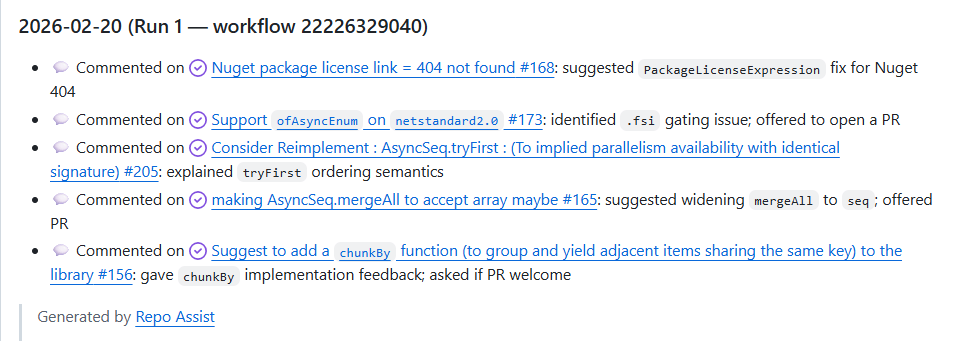
You can see from the above that I closed out ALL of these issues after Repo Assist had answered them.
For example, in Nov 2025 someone had asked about an AsyncSeq.tryFirst function which operates in parallel. The answer by Repo Assist is impeccable
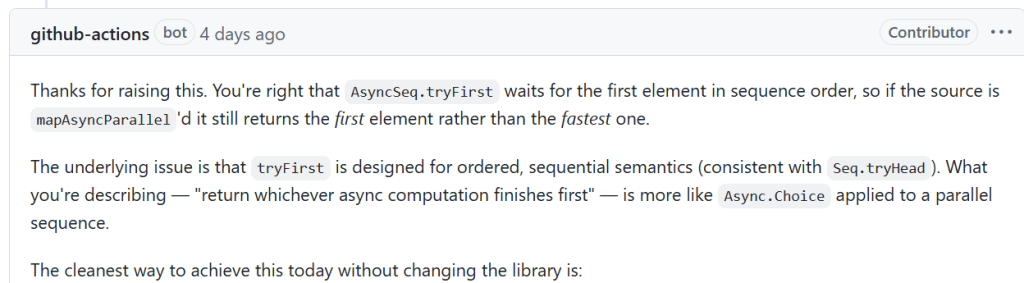
This analysis is correct and was enough for me to confidently close out the issue – an issue I had left lingering without proper answer for months.
Repo Assist is prompt-tuned to be conservative and only respond to issues once, and only when confidence is high. As a maintainer, your task is of course to check these answers. To help with this, in the monthly report Repo Assist maintains a crucial section Suggested Actions for Maintainer. This is, in many ways, the “front control plane” for Repo Assist in a repository. This is your go to.
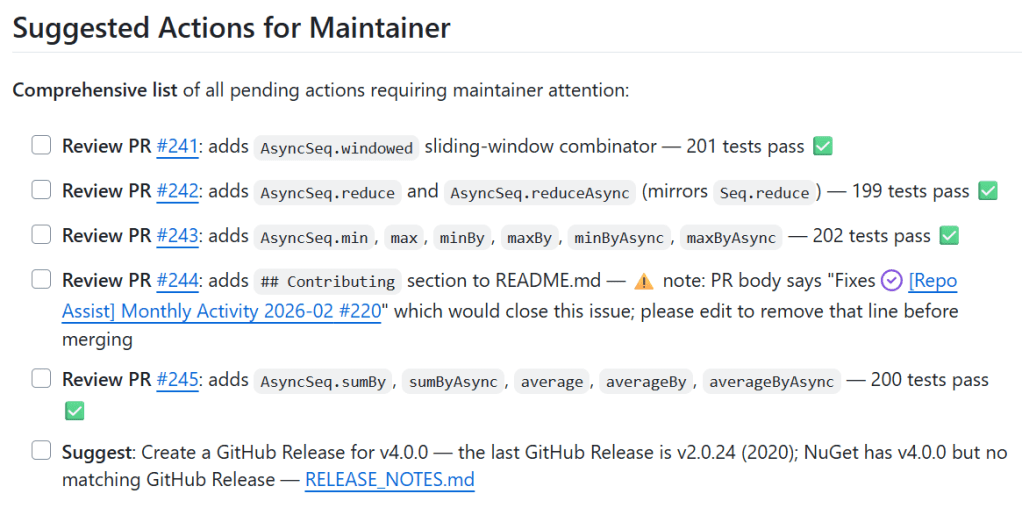
Maintainer in the Loop
Where, in a repository, is the maintainer most critically in the loop? The answer is: pull requests and comments. Repo Assist never merges a PR. It never adds new commits to an existing PR that it hasn’t created. This means, the maintainer is in the loop primarily in
- Reviewing issue comments and new issues.
- Reviewing, guiding and merging pull requests.
You can close issues, add guiding additional comments, use the “/repo-assist” immediate assistant, or simply ignore Repo Assist and maintain the repository as you normally would.
This can happen at whatever pace you choose, wherever you choose. You wake up in the morning, glance at some comments. You check the pull requests at your leisure. You add comments to them. This is slow pace maintenance, or faster pace if you use “blast mode”. And of course you can check out the code and crank the handle using your favourite coding agent for the fastest mode of all.
But the point is: the repository is being maintained. The backlog of questions are being analyzed, carefully, answered conservatively but well. Engineering analysis is being performed proactively. Even features may be planned and implemented proactively, if they are conservatively reasonable within the implied goals of the repository. Though of course they are only proposed, and never merged.
Backlog? Yes please!
Repo Assist is designed to work with repositories with large amounts of technical debt.
How does it do this? It’s very simple:
- It uses Repo Memory …
- ..to store a notes about where it’s up to …
- ..guided by this very simple prompting.
Here’s the prompting:
Use persistent repo memory to track:

- issues already commented on (with timestamps to detect new human activity)
- fix attempts and outcomes, improvement ideas already submitted, a short to-do list
- a backlog cursor so each run continues where the previous one left off
- which tasks were last run (with timestamps) to support round-robin scheduling
- the last time you performed certain periodic tasks (dependency updates, release preparation) to enforce frequency limits
- previously checked off items (checked off by maintainer) in the Monthly Activity Summary to maintain an accurate pending actions list for maintainers

Read memory at the **start** of every run; update it at the **end**.
Nice and simple! And an important caveat is added:
Important: Memory may not be 100% accurate. Issues may have been created, closed, or commented on; PRs may have been created, merged, commented on, or closed since the last run. Always verify memory against current repository state - reviewing recent activity since your last run is wise before acting on stale assumptions.
The end result: Repo Assist works systematically and reliably through your entire issue backlog, run by run, issue by issue. It labels, analyzes, responds and, in some cases, creates PRs to fix. And it engages with new issues, new comments, revists issues based on recent activity.
As I’ve crafted it, Repo Assist is in daily slow burn by default. You can customise that. Daily is not a lot, but it’s enough for basic progress and maintainer assistance in slow repositories. I also operate it now and then in “blast” mode (see above), but that’s not essential. What counts is that it’s there, helping, and I can sleep easy. My maintainer’s burden is lifted, and the potential of software is back.
Proactive Engineering Improvements
One of the hardest things about long term software maintenance is keeping the engineering base of a repository up-to-date and aligned with improvements available in the ecosystem. New versions of Java, .NET, NodeJS. New language versions. Bewildering requirements changes. New features you never new existed.
One of the tasks of Repo Assist is to assess the engineering state of repositories and help make forward progress in modernizing them. This is a form of Continuous Improvement. As an example, one of my co-maintainers knows about Trusted Publishing. Repo Assist helped bring that in. In another pull request Repo Assist updated dependencies and made code adjustments. In another run it updated a complex repository from .NET 5 to .NET 8.
One of the future things I will add to Repo Assist is the flipside of this: a task to assess that the repository is making use of its existing dependencies as well as possible. A version of this for Go dependencies is in our blog series on Peli’s Agent Factory.
Taking the Pressure off Maintainers?
Maintainers are under a lot of pressure from AI. AI makes it very easy to generate issues pull requests and throw them at repositories. Those issues are very real, and I’ve experienced them in other repositories, but they are not the thing I’m dealing with in this post.
In Repo Assist, we see hints of a possible flipside of that, at least for the kind of long-term maintenance of smaller repos I’m dealing with here. I’m very loathe and sceptical about “AI to help” narratives. I have a high standard. But in this case, I get the feeling that maintainers can use technologies like GitHub Agentic Workflows – proactive, automated AI – for our goals, for our needs, to give forward progress to our repos in the way we desire.
Crucial to this is that maintainers are in control of the automation and tasks that need to be done in their repositories. GitHub Agentic Workflows is all about giving maintainers control over how much automated AI they use – if any at all. There are two approaches to shaping this
- Use lots of different workflows, each with one task
- Use one workflow, that round-robins through different tasks
Peli’s Agent Factory is an example of the first method. Repo Assist is an example of the second. There are pros and cons to each. For task-based repository maintenance that causes me to sleep well at night, the second is a good fit for me.
The repos in this post are not the cutting edge of large-scale repository maintenance – they don’t have 10,000 issues with 10s or 100s of pull requests each day. They are slow, long term maintenance. But they have a backlog, and that backlog is part of what prevents them moving forward.
The Computer Science Perspective
I’ve been thrilled to find that something I’ve helped create – GitHub Agentic Workflows – has been so useful for my own needs as a maintainer and long-term community participant. There is so much backlog to be worked through, so much work to be done. And I’m glad to have the tools to once again allow me to do it.
However there’s a bigger picture here, about how the practice of computing is changing. Software engineering in particular is changing, at an incredible pace.
I’ve written on LinkedIn that I believe that every CS/Informatics department should already be looking at a course on AI assisted software development.
One of the frustrating things about the discourse around software engineering and AI is that it is dominated by the “Individual Developer Productivity” modailty – ignoring the Software Development Life Cycle, including maintenance, and community.
There are so many elements missing if we focus only on Individual Developer Productivity. I’d like to see different themes in these discussions. The work we’re doing on Repo Assist and on Peli’s Agent Factory has convinced me that, going forward, we will see an emphasis on proactive, continuous AI that improves and maintains and sustains. That refactors, simplifies and restyles, continuously re-engineers and continuously optimizes, proactively fixes and proactively analyzes. You can even have workflows that continuously apply stronger typing or make code use more functional programming.
These are foundational elements of software engineering going forward: proactive, continuous AI for software improvement. Yes, things like I’ve shown in this post are point-in-time realisations of these themes. Yes, things will improve and change. But underlying this there are real principles – principles that we need to teach our students now. Principles of what constitutes improvement. Principles of how to balance goals and outcomes. Principles of progress and potential.
Because the entire world of software engineering is changing, and we need to give them ways to think about it that will sustain them into that change for years ahead.
Resources:
You can find me on BlueSky or drop a comment below.

 @dsyme on software